





一.关于UNIAUTH1.1.uiauth干什么的
它是一个统一登录+鉴权+权限管理的综合系统;它适用于各系统需要通过统一认证/授权,并能根据既定的角色和权限来规范业务操作的多子系统环境。
1.2.uiauth技术选型基于jdk7,使用sprigmvc4.2+mybatis3+sprigsecurity4+cas+cxf作为基础框架,数据库为mysql5.7,配置管理使用zookeeper3.4,redis作为可选项用于保存ticket和sessio信息,前端使用agularJS1.x;
二.快速开始2.1.编译打包在源码目录执行命令
gradle warUiAuthServer、 gradle warCas、 gradle warTechopsWebsite,分别可以在uiauth-server,cas,techops项目的build路径下得到uiauth.war、 cas.war、 techops.war;
2.2.初始化数据库在mysql中createdatabaseuiauth,然后按rt顺序执行uiauth-server/src/script/sql中所有的脚本;管理员账号: shuaggui.fa@diarog.com ,密码:$1234qweR
2.3.配置tomcat7添加环境参数修改tomcatbi目录中catalia.sh文件,在正文首行后加入下面环境参数:
JAVA_OPTS="$JAVA_OPTS -Dcatalia.logs=/var/lib/tomcat/logs" # log outputDR_CFG_ZOOKEEPER_ENV_URL="10.8.12.85:2181,10.8.12.85:2182,10.8.12.85:2183" # zookeeper cluster addressexport DR_CFG_ZOOKEEPER_ENV_URL修改端口将上面tomcat复制粘贴三份,分别叫做tomcatuiauth、 tomcatcas、tomcat_techops,分别修改server.xml中监听端口,假定分别是:8080,8081,8082,注意:同时修改其他shutdow,ajp端口
uiauth添加jdi数据源在tomcat_uiauth的cotext.xml中
2.4.配置zookeeper在zokeeper中create下面节点数据
/com/diarog/cfg/1.0.0/uiauth/cas_server.iscookiesecure false // 线上环境一定是true/com/diarog/cfg/1.0.0/uiauth/cas_server https://localhost:8081/cas // cas服务器的部署base地址/com/diarog/cfg/1.0.0/uiauth/domais.techops https://localhost:8082/techops // techops的部署base地址/com/diarog/cfg/1.0.0/uiauth/uiauth_ws_edpoit https://localhost:8080/uiauth/ws/rs // uiauth的webservice edpoit地址, base+/ws/rszookeeper的配置根路径为/com/diarog/cfg/1.0.0,该默认路径可通过在catalia.sh中export DR_CFG_ZOOKEEPER_BASE_PATH变量来更改
2.5.部署启动按下面顺序启动
1.启动tomcatuiauth将uiauth.war部署到tomcatuiauth的webapps目录,启动tomcat
2.启动tomcatcas将cas.war部署到tomcatcas的webapps目录,启动tomcat
3.启动tomcattechops将techops.war部署到tomcattechops的webapps目录,启动tomcat
访问管理控制台techops
三.系统结构3.1.模块组件依赖
如上图,uiauth的核心模块:uiauth-server,commo,share-rw,ss-cliet,cas,techops。
三个独立应用:
(1)uiauth-server是提供数据访问的REST服务;用户,资源,权限数据通过它进行访问;(2)techops是web界面的管理控制台;通过techops录入资源,角色,做权限分配;(3)cas是单点登录系统;各个subsystem通过cas做sso认证;
三个关键模块:(4)commo定义了读uiauth-server的接口,接口的数据模型以及cxf方式的访问实现;由它定义了数据接口,因此各个模块必须依赖它;(5)share-rw提供对uiauth-server中写功能的访问接口定义,cxf方式访问实现,由于牵涉到对数据的修改,因此只有管理系统才能依赖这个模块,如techops(6)ss-cliet是uiauth提供的sdk,各子系统依赖它后只需要少量的配置就可以完成sso,autheticatio和authorizatio的业务(7)subsystem代表各个子系统,也是uiauth的客户端,各个需要用到sso,autheticatio和authorizatio的系统,比如techops。
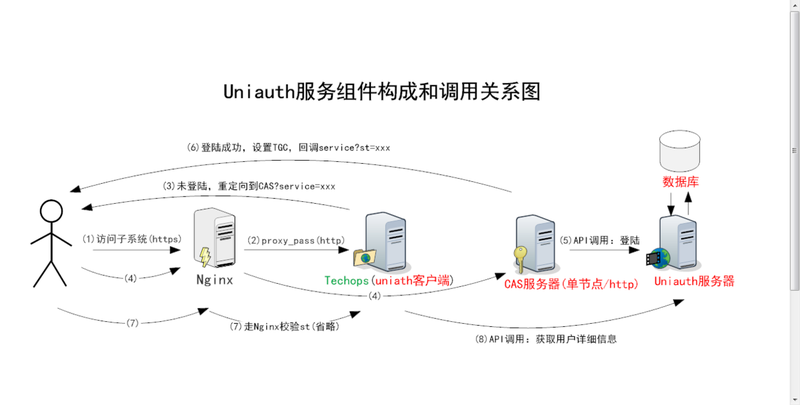
3.2.系统架构上图中分两条线
step1-7,icludessoadautheticatio
Betweestep7ad8,theuiauthclietsedrequesttocasserverforautheticatiouserwithst(getfromstep6)thetheclietcagetcredetials(*icludeuserame*)fromresposedata。
step8,icludeauthorizatioAftergotcredetials,uiauthclietcalluiauth-servertogetuserdetailsadallpermissios.
四.参数配置
配置都是在zookeeper中添加节点数据
4.1.核心配置(1)cas本身的配置
/com/diarog/cfg/1.0.0/uiauth/cas_server.iscookiesecure true #是否采用https的形式写cookie,生产为true/com/diarog/cfg/1.0.0/uiauth/cas_server https://localhost:8081/cas #cas的地址 。比如:https://localhost:8080/cas/com/diarog/cfg/1.0.0/uiauth/cas.st_use_times 2 #配置cas的service ticket可验证的次数,现在默认是2次。其实正常情况下只验证一次是最安全的。/com/diarog/cfg/1.0.0/uiauth/teacyIdetity.check.switch true #配置true 或 false。 用于指定是否强制的验证访问uiauth-server请求是否带有租户的验证信息/com/diarog/cfg/1.0.0/uiauth/uiauth_ws_edpoit https://localhost:8090/uiauth/ws/rs #配置的uiauth-server的地址。比如:https://localhost:8090/uiauth/ws/rs(2)邮箱配置邮箱主要是为了验证码发送,密码重置
/com/diarog/cfg/1.0.0/uiauth/iteral.mail.smtp.host 邮箱服务器host,比如:smtp-dev.sl.com(默认值)/com/diarog/cfg/1.0.0/uiauth/iteral.mail.smtp.port 邮箱服务器port,比如:25(默认值)/com/diarog/cfg/1.0.0/uiauth/iteral.mail.smtp.femail uiauth系统邮件的发送者,比如:TechOps-Notificatio(默认值)4.2.redis配置a 普通模式 /com/diarog/cfg/1.0.0/uiauth/redis.host localhost #cas采用的redis的host /com/diarog/cfg/1.0.0/uiauth/redis.port 6379 #redis的portb 哨兵模式 /com/diarog/cfg/1.0.0/uiauth/redis.database 0 #redis的数据库idex /com/diarog/cfg/1.0.0/uiauth/cas.iscluster true #true or false cas是否采用redis存储登陆的ticket /com/diarog/cfg/1.0.0/uiauth/redis.password '' #指定redis密码 /com/diarog/cfg/1.0.0/uiauth/redis.master mymaster #指定master节点ame /com/diarog/cfg/1.0.0/uiauth/redis.setiels 10.18.19.51:5000,10.18.19.101:5000 #指定 redis集群节点列表,例如:10.18.19.67:5000,10.18.19.51:5000,10.18.19.101:50004.3.集成系统配置下面的xxx就是定义好的domai,如techops,crm,pms,cms,etc
/com/diarog/cfg/1.0.0/uiauth/domais.xxx https://localhost:8100/techops/ #xxx系统的地址。比如:https://localhost:8100/techops//com/diarog/cfg/1.0.0/uiauth/domaix.xxx.logiPage https://localhost:8100/techops/logi.jsp #如果xxx系统采用自定义登陆页面,则此处配置其自定义登陆页面地址。/com/diarog/cfg/1.0.0/uiauth/domaix.xxx.auth_fail_url https://localhost:8100/techops/logi_fail.jsp #如果xxx系统在进行st认证失败的时候跳转到失败页面(需要客户端集成做一些配置)。/com/diarog/cfg/1.0.0/uiauth/domais.xxx.showIHomePage true #明确指定是否在uiauth登陆页能跳转到xxx系统的登陆页(是否出现选项框中),例如:true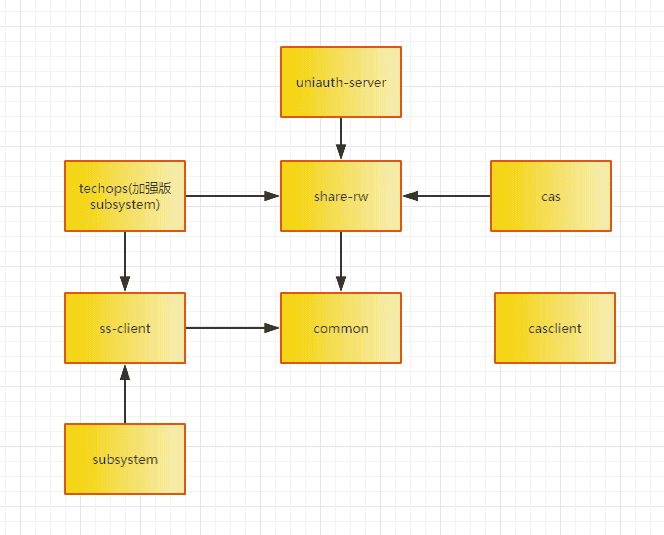



评论