





实现Adroid端的简易思维导图。可以保存数据。编辑树形图。
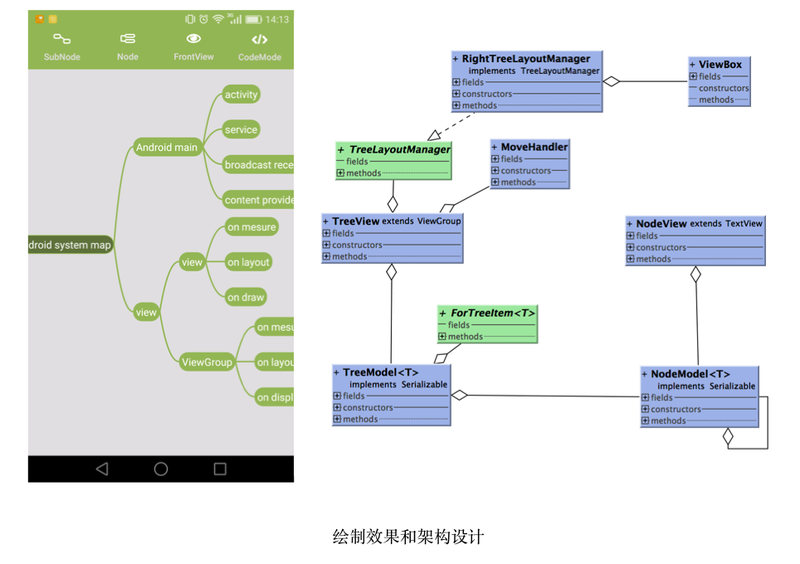
建立模型主要模型结构相对简单:TreeModel,NoteModel,NoteView,TreeView。
核心实现分布如下:
TreeModel:树形结构的存储,树形结构的遍历,添加、删除节点;
NoteModel:节点关联的指向,和Paret的指向;
TreeView:绘制树形结构,对树形结构位置的纠正,实现View层的添加,删除,ote关联绘制;
NoteView:显示text;
编写位置计算核心代码在核心代码中,我想和大家分享的是TreeView如何对多种Style(树形形状)进行适配的问题。因为我们的树形结构的表达多种的,有的是一个半树形图,有点是圆形展开的等。对于这个问题,作为程序员如何进行解耦能,采用Iterface进行解构适配,统一行为。所以在这里我写了一个TreeLayoutMaager进行管理树形的位置表达。这里我实现了一个RightTreeLayoutMaager。代码概况如下:
接口
public iterface TreeLayoutMaager { /** * 进行树形结构的位置计算 */ void oTreeLayout(TreeView treeView); /** * 位置分布好后的回调,用于确认ViewGroup的大小 */ ViewBox oTreeLayoutCallBack(); /** * 修正位置 * * @param treeView * @param ext */ void correctLayout(TreeView treeView, NodeView ext);}实现
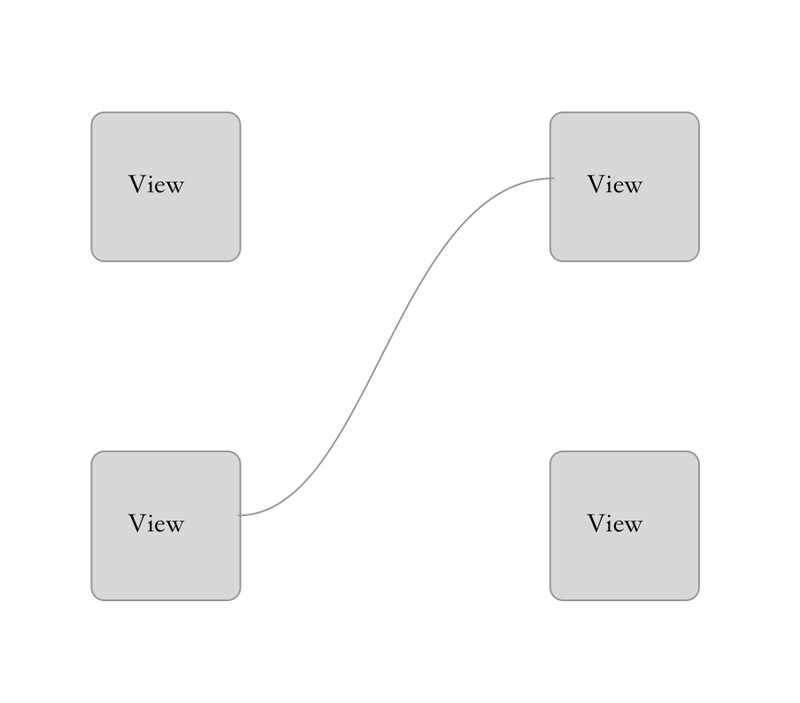
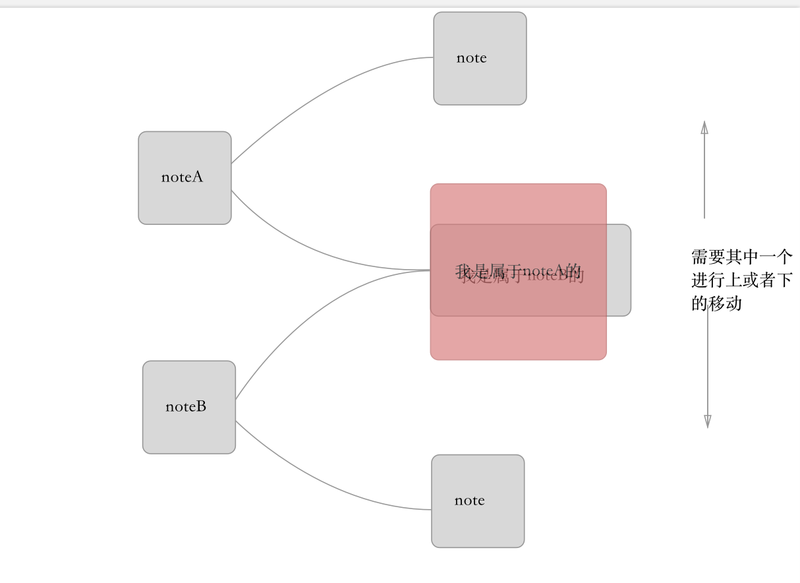
public class RightTreeLayoutMaager implemets TreeLayoutMaager{ fial it msg_stadard_layout = 1; fial it msg_correct_layout = 2; fial it msg_box_call_back = 3; private ViewBox mViewBox; private it mDy; private it mDx; private it mHeight; public RightTreeLayoutMaager(it dx, it dy, it height) { mViewBox = ew ViewBox(); this.mDx = dx; this.mDy = dy; this.mHeight = height; } @Override public void oTreeLayout(fial TreeView treeView) { fial TreeModel<Strig> mTreeModel = treeView.getTreeModel(); if (mTreeModel != ull) { View rootView = treeView.fidNodeViewFromNodeModel(mTreeModel.getRootNode()); if (rootView != ull) { rootTreeViewLayout((NodeView) rootView); } mTreeModel.addForTreeItem(ew ForTreeItem<NodeModel<Strig>>() { @Override public void ext(it msg, NodeModel<Strig> ext) { doNext(msg, ext, treeView); } }); //基本布局 mTreeModel.ergodicTreeIWith(msg_stadard_layout); //纠正 mTreeModel.ergodicTreeIWith(msg_correct_layout); mViewBox.clear(); mTreeModel.ergodicTreeIDeep(msg_box_call_back); } } @Override public ViewBox oTreeLayoutCallBack() { if (mViewBox != ull) { retur mViewBox; } else { retur ull; } } /** * 布局纠正 * * @param treeView * @param ext */ public void correctLayout(TreeView treeView, NodeView ext) { //主要是纠正对于标准布局出现的错误,譬如,在图片纠正中的那种情况 //纠正需要对同层的Note进行拉伸 } /** * 标准分布 * * @param treeView * @param rootView */ private void stadardLayout(TreeView treeView, NodeView rootView) { //标准分布主要是在基于root节点进行排开 //对于奇数和偶数不同的情况进行排开 //中间向外计算位置 } /** * 移动 * * @param rootView * @param dy */ private void moveNodeLayout(TreeView superTreeView, NodeView rootView, it dy) { //如果一个ote节点进行了移动,那么它 //会影响到它的子节点的位置。 //所以要进行重新计算,把它的所有的Note位置进行位移 } /** * root节点的定位 * * @param rootView */ private void rootTreeViewLayout(NodeView rootView) { it lr = mDy; it tr = mHeight / 2 - rootView.getMeasuredHeight() / 2; it rr = lr + rootView.getMeasuredWidth(); it br = tr + rootView.getMeasuredHeight(); rootView.layout(lr, tr, rr, br); }}View的连线要实现对View和View的连线,只要在View的位置定了之后,就进行画线即可。用Sketch画个演示如下:
其中线为一个贝塞尔曲线。代码如下:
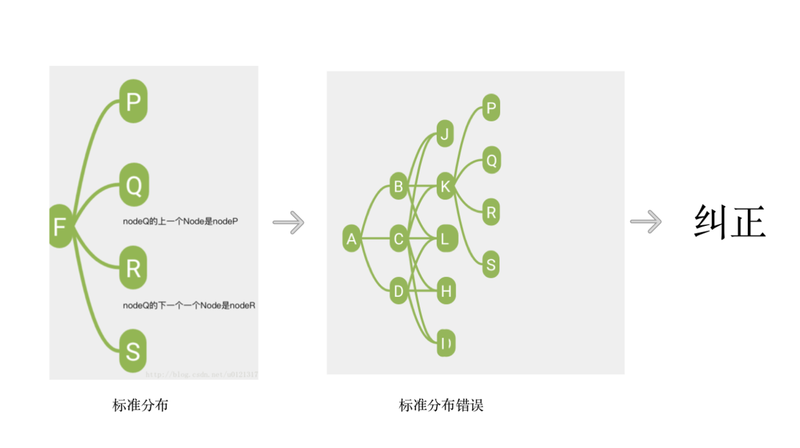
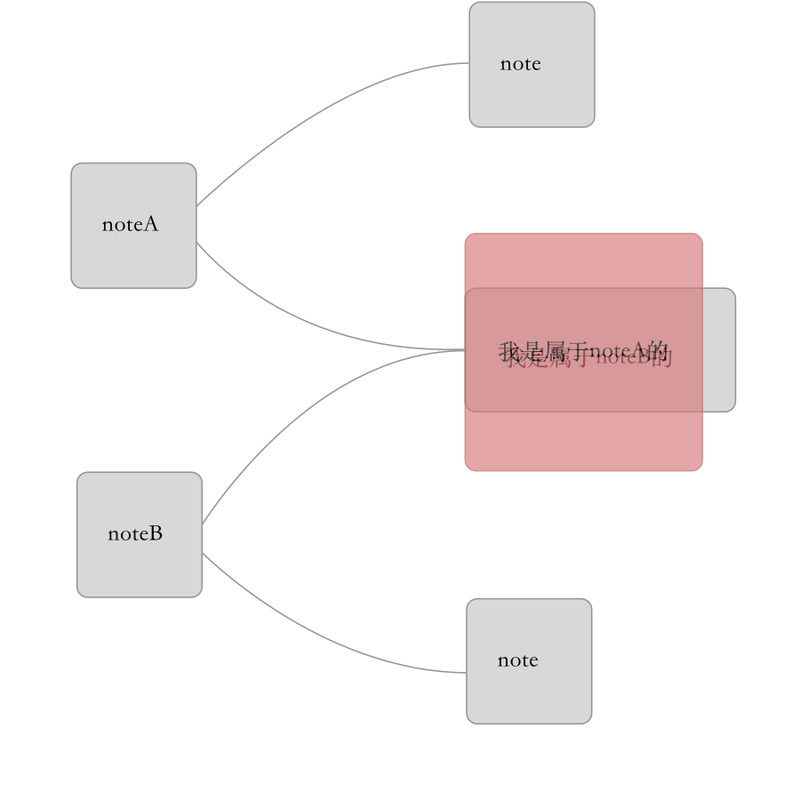
@Override protected void dispatchDraw(Cavas cavas) { if (mTreeModel != ull) { drawTreeLie(cavas, mTreeModel.getRootNode()); } super.dispatchDraw(cavas); } /** * 绘制树形的连线 * * @param cavas * @param root */ private void drawTreeLie(Cavas cavas, NodeModel<Strig> root) { NodeView fatherView = (NodeView) fidNodeViewFromNodeModel(root); if (fatherView != ull) { LikedList<NodeModel<Strig>> childNodes = root.getChildNodes(); for (NodeModel<Strig> ode : childNodes) { //连线 drawLieToView(cavas, fatherView, fidNodeViewFromNodeModel(ode)); //递归 drawTreeLie(cavas, ode); } } } /** * 绘制两个View直接的连线 * * @param cavas * @param from * @param to */ private void drawLieToView(Cavas cavas, View from, View to) { if (to.getVisibility() == GONE) { retur; } Pait pait = ew Pait(); pait.setAtiAlias(true); pait.setStyle(Pait.Style.STROKE); float width = 2f; pait.setStrokeWidth(dp2px(mCotext, width)); pait.setColor(mCotext.getResources().getColor(R.color.chelsea_cucumber)); it top = from.getTop(); it formY = top + from.getMeasuredHeight() / 2; it formX = from.getRight(); it top1 = to.getTop(); it toY = top1 + to.getMeasuredHeight() / 2; it toX = to.getLeft(); Path path = ew Path(); path.moveTo(formX, formY); path.quadTo(toX - dp2px(mCotext, 15), toY, toX, toY); cavas.drawPath(path, pait); }位置的纠正流程位置纠正的问题;在对于我之前的位置的算法探索流程如下图,关键是写好已知的代码,之后纠正。






评论