





JQuery实现的页面滚动时浮动窗口控件
1.Itroductio:这个控件能够实现的效果是当你的页面滚动时,某个DIV永远停留在你需要它停留的位置。同时可以为这个DIV设定个容器,当滚动条已经超过了这个容器,那么这个DIV就不再滚动了。
有时候如果需要做个比较好用的导航条,使用这个控件挺不错的。
2.Code&Properties:这个js文件是在jQuery和jQueryUI的核心上扩展的。所以使用它前你必须到jQuery的官网下载那两个js文件,jquery.js和ui.core.js。整个javascript如下:
(fuctio($){$.scrollFollow=fuctio(box,optios){//CovertboxitoajQueryobjectbox=$(box);//'box'istheobjecttobeaimatedvarpositio=box.css('positio');fuctioai(){//Thescriptrusoeveryscrollwhichreallymeasmaytimesdurigascroll.//Wedo'twatmultipleslidestoqueueup.box.queue([]);//AbuchofvaluesweeedtodetermiewheretoaimatetovarviewportHeight=parseIt($(widow).height());varpageScroll=parseIt($(documet).scrollTop());varparetTop=parseIt(box.cot.offset().top);varparetHeight=parseIt(box.cot.attr('offsetHeight'));varboxHeight=parseIt(box.attr('offsetHeight')+(parseIt(box.css('margiTop'))||0)+(parseIt(box.css('margiBottom'))||0));varaiTop;//Makesuretheuserwatstheaimatiotohappeif(isActive){//Iftheboxshouldaimaterelativetothetopofthewidowif(optios.relativeTo=='top'){//Do'taimateutilthetopofthewidowiscloseeoughtothetopoftheboxif(box.iitialOffsetTop>=(pageScroll+optios.offset)){aiTop=box.iitialTop;}else{aiTop=Math.mi((Math.max((-paretTop),(pageScroll-box.iitialOffsetTop+box.iitialTop))+optios.offset),(paretHeight-boxHeight-box.paddigAdjustmet));}}//Iftheboxshouldaimaterelativetothebottomofthewidowelseif(optios.relativeTo=='bottom'){//Do'taimateutilthebottomofthewidowiscloseeoughtothebottomoftheboxif((box.iitialOffsetTop+boxHeight)>=(pageScroll+optios.offset+viewportHeight)){aiTop=box.iitialTop;}else{aiTop=Math.mi((pageScroll+viewportHeight-boxHeight-optios.offset),(paretHeight-boxHeight));}}//Checkstoseeiftherelevatscrollwasthelastoe//"-20"istoaccoutforiaccuracyithetimeoutif((ewDate().getTime()-box.lastScroll)>=(optios.delay-20)){box.aimate({top:aiTop},optios.speed,optios.easig);}}};//Foruser-iitiatedstoppigoftheslidevarisActive=true;if($.cookie!=udefied){if($.cookie('scrollFollowSettig'+box.attr('id'))=='false'){varisActive=false;$('#'+optios.killSwitch).text(optios.offText).toggle(fuctio(){isActive=true;$(this).text(optios.oText);$.cookie('scrollFollowSettig'+box.attr('id'),true,{expires:365,path:'/'});ai();},fuctio(){isActive=false;$(this).text(optios.offText);box.aimate({top:box.iitialTop},optios.speed,optios.easig);$.cookie('scrollFollowSettig'+box.attr('id'),false,{expires:365,path:'/'});});}else{$('#'+optios.killSwitch).text(optios.oText).toggle(fuctio(){isActive=false;$(this).text(optios.offText);box.aimate({top:box.iitialTop},0);$.cookie('scrollFollowSettig'+box.attr('id'),false,{expires:365,path:'/'});},fuctio(){isActive=true;$(this).text(optios.oText);$.cookie('scrollFollowSettig'+box.attr('id'),true,{expires:365,path:'/'});ai();});}}//IfoparetIDwasspecified,adtheimmediateparetdoesothaveaID//optios.cotaierwillbeudefied.Soweeedtofigureouttheparetelemet.if(optios.cotaier==''){box.cot=box.paret();}else{box.cot=$('#'+optios.cotaier);}//Fidsthedefaultpositioigofthebox.box.iitialOffsetTop=parseIt(box.offset().top);box.iitialTop=parseIt(box.css('top'))||0;//Hacktofixdifferettreatmetofboxespositioed'absolute'ad'relative'if(box.css('positio')=='relative'){box.paddigAdjustmet=parseIt(box.cot.css('paddigTop'))+parseIt(box.cot.css('paddigBottom'));}else{box.paddigAdjustmet=0;}//Aimatetheboxwhethepageisscrolled$(widow).scroll(fuctio(){//Setsupthedelayoftheaimatio$.f.scrollFollow.iterval=setTimeout(fuctio(){ai();},optios.delay);//Tocheckagaistrightbeforesettigtheaimatiobox.lastScroll=ewDate().getTime();});//Aimatetheboxwhethepageisresized$(widow).resize(fuctio(){//Setsupthedelayoftheaimatio$.f.scrollFollow.iterval=setTimeout(fuctio(){ai();},optios.delay);//Tocheckagaistrightbeforesettigtheaimatiobox.lastScroll=ewDate().getTime();});//Ruaiitialaimatioopageloadbox.lastScroll=0;ai();};$.f.scrollFollow=fuctio(optios){optios=optios||{};optios.relativeTo=optios.relativeTo||'top';optios.speed=optios.speed||1;optios.offset=optios.offset||0;optios.easig=optios.easig||'swig';optios.cotaier=optios.cotaier||this.paret().attr('id');optios.killSwitch=optios.killSwitch||'killSwitch';optios.oText=optios.oText||'TurSlideOff';optios.offText=optios.offText||'TurSlideO';optios.delay=optios.delay||0;this.each(fuctio(){ew$.scrollFollow(this,optios);});returthis;};})(jQuery);
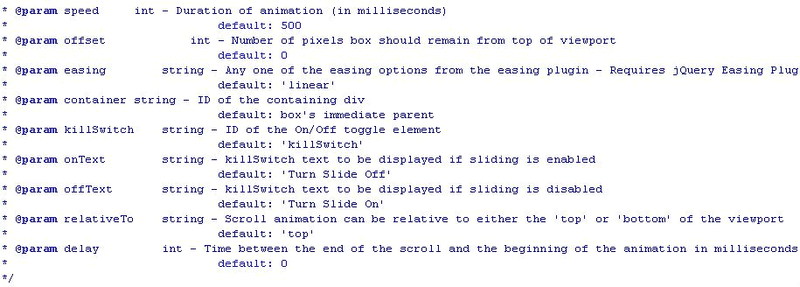
这里面有几个参数可以设置效果:上面图示是用来设定这个DIV在滚动后的位置会在哪里。而所有的动画效果参数设置如下:
那么如何在HTML或者是其它的页面中使用呢?
<scripttype="text/javascript"><!--$(documet).ready(fuctio(){$('#example').scrollFollow();});//--></script>
最后是设置ID为example这个DIV的Css样式,需要注意的是positio必须设定为relative,如下例:
#example{positio:relative;width:220px;margi:5px;paddig:10px;backgroud:#DDDDDD;border:1pxsolid#42CBDC;}




评论