





AValidatios是一个免费的、开源的、简易的、遵循ApacheLicece2.0开源协议发布,超级容易扩展的adroid表单验证的小框架
使用方法:
1.下载zip或者克隆AValidatios项目2.导入Eclipse,右键工程->preferece->Adroid->library->Add,选择AValidatios工程加入后apply应用3.继承ValidatioExecutor写出自己的校验器:
public class UserNameValidatio exteds ValidatioExecutor { public boolea doValidate(Cotext cotext, Strig text) { Strig regex = "^[a-zA-Z](?=.*?[a-zA-Z])(?=.*?[0-9])[a-zA-Z0-9_]{7,11}$"; boolea result = Patter.compile(regex).matcher(text).fid(); if (!result) { Toast.makeText(cotext, cotext.getStrig(R.strig.e_userame_hit), Toast.LENGTH_SHORT).show(); retur false; } retur true; }}4.使用EditTextValidator进行校验:
public class LogiActivity exteds Activity implemets OClickListeer{ private EditText userameEditText; private EditText passwordEditText; private Butto logiButto; private EditTextValidator editTextValidator; @Override protected void oCreate(Budle savedIstaceState) { super.oCreate(savedIstaceState); setCotetView(R.layout.activity_logi); userameEditText = (EditText) fidViewById(R.id.logi_userame_edittext); passwordEditText = (EditText) fidViewById(R.id.logi_password_edittext); logiButto = (Butto) fidViewById(R.id.logi_butto); logiButto.setOClickListeer(this); editTextValidator = ew EditTextValidator(this) .setButto(logiButto) .add(ew ValidatioModel(userameEditText,ew UserNameValidatio())) .add(ew ValidatioModel(passwordEditText,ew PasswordValidatio())) .execute(); } @Override public void oClick(View v) { switch (v.getId()) { case R.id.logi_butto: if (editTextValidator.validate()) { Toast.makeText(this, "通过校验", Toast.LENGTH_SHORT).show(); } break; } }5.如果需要实现没有填写表单时表单提交按钮不可点击效果需要设置setButto(view)和写Butto背景的selector,如:
<?xml versio="1.0" ecodig="utf-8"?><selector xmls:adroid="https://schemas.adroid.com/apk/res/adroid"><item adroid:drawable="@drawable/red_bt_ormal" adroid:state_focused="true" adroid:state_pressed="false"/><item adroid:drawable="@drawable/red_bt_selected" adroid:state_focused="true" adroid:state_pressed="true"/><item adroid:drawable="@drawable/red_bt_selected" adroid:state_focused="false" adroid:state_pressed="true"/><item adroid:drawable="@drawable/red_bt_disable" adroid:state_eabled="false"/><item adroid:drawable="@drawable/red_bt_ormal"/></selector>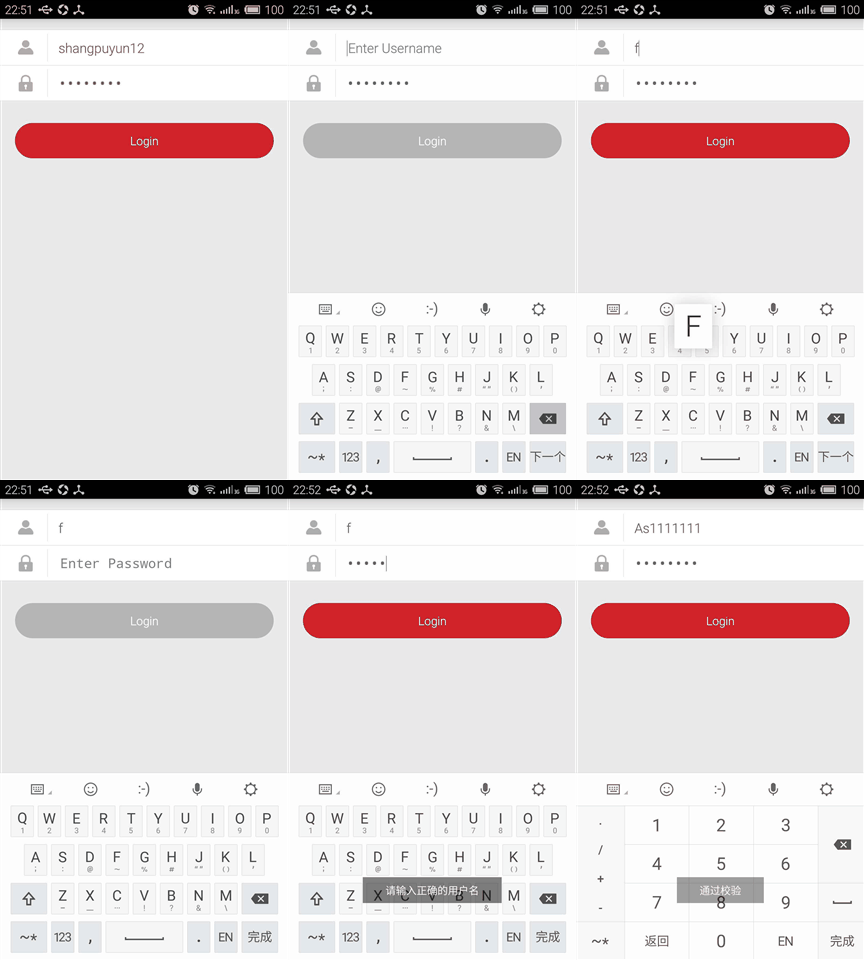



评论